
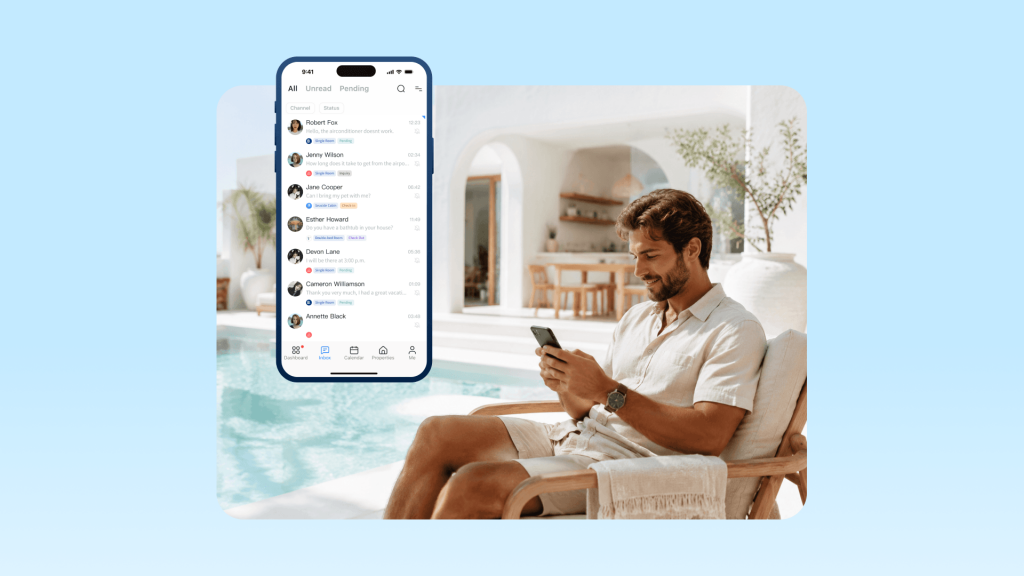
In short-term rental operations, response time to guest inquiries directly affects booking performance. Guests usually contact multiple listings at the same time, and they tend to continue with hosts who reply quickly, clearly, and confidently. One of the simplest ways to migliorare la comunicazione con gli ospiti efficiency without reducing service quality is to use canned responses. They help hosts handle repetitive questions faster while keeping replies consistent and professional.
In this guide, you will learn the essential canned response templates every host needs. We will also cover when to use them and how to set them up in your Sindrome premestruale.
What Are Canned Responses?
Canned responses are reusable message templates used for repetitive guest communication such as istruzioni per il check-in, Wi-Fi details, parking guidance, and booking confirmations.
They are not automated replies. Hosts manually select and send them during conversations. This allows flexibility to adjust tone or add context before sending.
In modern property management systems like Hostex, these templates are not isolated text snippets. They are part of a larger communication workflow that connects manual replies, messaggi attivati, E AI-assisted responses.
When to Use Canned Responses (and When Not To)
Canned responses are most effective in situations where information is standard and frequently repeated.
Use them for:
- Check-in and check-out instructions
- Access details like Wi-Fi or door codes
- Parking and location guidance
- Common pre-arrival questions
- Booking confirmations and reminders
Avoid them when:
- A guest reports a problem or urgency
- The message requires negotiation or flexibility
- The situation involves personal context or emotions
In those cases, a direct and adaptive response is more appropriate than a template.
How to Build a Canned Response System
A canned response system works best when it is designed as part of your communication workflow, not just a collection of saved replies. The goal is to reduce repetitive typing while keeping guest communication consistent and easy to manage at scale.
1. Collect core message types
Start by grouping the messages you already send most often. In most short-term rental operations, these usually fall into a few predictable categories:
- Booking inquiries and availability questions
- Pre-arrival and check-in instructions
- On-site information like Wi-Fi, parking, and access
- Mid-stay communication and support
- Check-out reminders and post-stay messages
You do not need dozens of templates at the beginning. A small set that covers your daily communication flow is usually enough to make a noticeable difference.
2. Organize your library for fast access
Once message types are defined, the next step is to organize them in a way that matches how conversations actually flow.
Instead of storing templates in a single flat list, group them according to the guest journey, such as pre-booking, pre-arrival, in-stay, and post-stay communication.
This structure reduces search time and makes it easier to select the right response during live conversations, especially when handling multiple listings at once.
3. Set it up inside your PMS
A canned response system only becomes truly effective when it is connected to a property management system.
Short-term rental hosts rarely operate on a single channel. Guest messages often come from Airbnb, Booking.com, Vrbo, and direct bookings at the same time. Without a centralized system, communication becomes fragmented and harder to manage.
A PMS like Ospite consolidates all OTA messages and templates in one place, so you can manage conversations without switching platforms.
It also allows you to fully utilize canned responses. You can insert templates directly in guest chats, or use them in automated triggered messages that send booking confirmations and check-in instructions based on predefined rules.
The 7 Essential Canned Response Templates
1. Inquiry Acknowledgement
Send this the moment someone asks about availability or rates, even if you plan to follow up with a more detailed reply later.
Thanks for reaching out about [property name]! I have received your message and will get back to you with full details within [timeframe]. In the meantime, feel free to check our availability calendar and photos on the listing page.
2. Booking Confirmation (with next steps)
Use this right after a booking is confirmed to reassure the guest and set expectations.
Your booking at [property name] is confirmed! Here is what happens next:
- Check-in instructions will be sent [X days] before arrival
- The property address will be included in those instructions
- Please let me know if you have any questions about the neighborhood, parking, or amenities
Looking forward to hosting you!
3. Check-in Instructions
The most-used template for most hosts.
Welcome to [property name]! Here is everything you need for a smooth check-in:
- Address: [full address]
- Check-in time: [time]
- Access instructions: [lockbox code / smart lock code / key pickup details]
- Wi-Fi network: [network] | Password: [password]
- Parking: [instructions]
If anything comes up during your stay, just reply to this message. I am available [hours / contact method].
4. FAQ Quick Answers
Common questions that come up repeatedly:
| Question | Sample Response |
|---|---|
| Early check-in? | “Early check-in is possible if the property is ready. I can confirm on the morning of your arrival. Standard check-in is [time].” |
| Late checkout? | “Late checkout is available for [fee/free] depending on availability. Let me know what time you are thinking.” |
| Extra guests? | “The property sleeps [max guests]. Additional guests beyond that require approval and may incur a fee.” |
| Pet policy? | “Pets are [welcome / not permitted]. If you are bringing a pet, please confirm so I can prepare the property.” |
5. Mid-Stay Check-in
A simple message to ensure everything is going smoothly and offer support if needed.
Hope you are enjoying your stay at [property name]! Just checking in to make sure everything is going well. If you need anything – extra towels, local recommendations, or help with any appliances – just let me know.
6. Check-out Reminders
Reminder for check-out time and basic departure instructions.
Quick reminder: check-out is tomorrow at [time]. Please leave the keys in the lockbox and start a load of towels if you can. Safe travels, and I would love to host you again!
7. Richiesta di revisione
A polite follow-up message requesting a review after the stay.
Thanks again for staying at [property name]! If you have a moment, we would really appreciate a review on [platform]. Your feedback helps other travelers know what to expect, and it helps us keep improving. Here is the link: [review URL]
How to Keep Templates from Sounding Robotic
Your guests know they are reading a template. The goal is not to hide that but to make the message feel thoughtful anyway.
- Personalize one detail. Add the guest’s name and reference something specific: “I hope you enjoy the deck, the sunset views from there are amazing.” One sentence changes the whole tone.
- Use contractions. “I am” not “I am.” “You will” not “you will.” Contractions make written text sound like speech.
- Keep it short. Templates that read like a form letter usually are too long. Strip everything that does not need to be there.
- Add your voice. If you are a casual host, sign off with “Cheers” or “Happy travels.” If you are more formal, stick with “Best regards.” Consistency helps guests feel like they are talking to a real person.
Pensiero finale
Once your canned responses are in place, the real value comes from measuring whether they actually improve your operations.
A simple starting point is response time. Most platforms, including Airbnb, show this in the performance dashboard. If replies move from hours to minutes, your system is working as intended.
Another key indicator is the conversion rate. Compare inquiry-to-booking performance before and after using canned responses. For many hosts, a 10–20 percent improvement is realistic, especially if response speed was previously inconsistent.
Time efficiency is often the most noticeable change. If a message used to take 15 minutes and now takes only a few, the time savings quickly add up across multiple listings and bookings.
Finally, guest feedback gives a broader signal. If review volume stays stable or improves, it usually means faster communication has not come at the expense of guest experience.
In practice, these signals together show whether your canned responses are simply saving time, or actually helping you capture more bookings.

 Italian
  English
  Japanese
  Spanish
  Arabic
  French
  Russian
  German
  Portuguese
  Korean
  Thai
Thai