
Managing vacation rentals for multiple property owners involves more than handling bookings and guest communication. Property managers also need to keep owners informed about revenue, expenses, and booking activity. An owner portal provides a convenient way to share this information.
This guide explains what an owner portal is, what information owners need, and how to share it through financial reports, restricted account access, and calendar sharing.
What Is an Owner Portal?
An owner portal is an online platform that allows property managers to share property information, financial reports, and operational updates with property owners.
Why does this matter? Because an owner is an investor, and investors want two things above all: transparency and regularity. When the numbers are clear and arrive on time, trust builds without a conversation. When they are vague or late, every small issue becomes a reason to question the whole relationship.
What Information Should an Owner Portal Include?
Start with what the owner is really asking when they call you at the end of the month. It is almost always the same question: how much did I make, and how did you arrive at that number?
A useful owner portal answers that question in three layers.
1. Financial Reports
Owners need to understand how rental revenue translates into the amount reported as payable to them.
A useful owner report may include:
- Gross rental revenue
- Booking platform and payment processing fees
- Cleaning and other property expenses
- Management fees or commissions
- Other applicable adjustments
- Owner net amount or payout
The exact fields depend on the management agreement and accounting method. The report should also distinguish the owner’s net amount from the actual payout when the two differ because of payment timing or other adjustments.
2. Property Performance
Financial results become more meaningful when owners can compare them over time.
Useful metrics include:
- Occupancy rate: The proportion of available nights occupied during a defined period.
- Number of bookings: The number of reservations received or completed, depending on the reporting method.
- Average nightly rate: The average revenue per occupied night, based on a consistent calculation.
- Revenue trends: Changes in revenue compared with previous reporting periods.
These figures help owners understand changes in property performance rather than relying on a single revenue total.
3. Booking Calendar
A booking calendar shows which dates are reserved, which remain available, and when upcoming stays are scheduled.
This gives owners a quick overview of reservation activity between financial reports. Depending on the software and sharing settings, the calendar may show only basic booking information or provide access to additional details.
How to Share Property Information With Owners
A dedicated owner portal is not the only way to give owners access to their property information. Property managers can also use scheduled reports, restricted software accounts, and shared calendars.
1. Send Regular Financial Reports
Monthly financial reports are one of the most common ways to keep vacation rental owners informed about their property’s earnings.
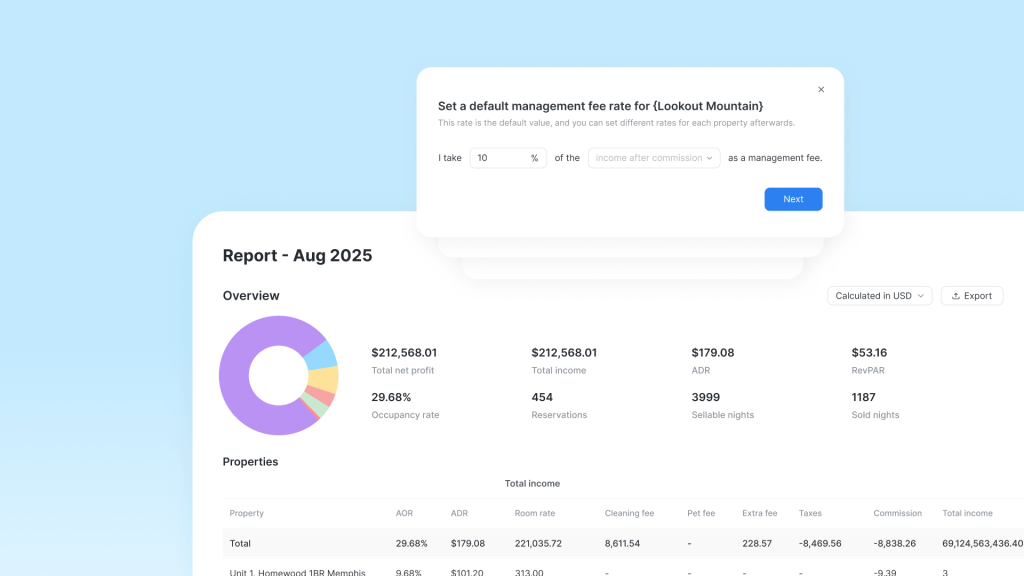
Hostex's Conexão do proprietário automates this process with just a few initial settings:
- Assign properties: Select the property or properties for each owner.
- Set the management fee: Define the management fee or commission.
- List deductions: Specify the expenses and fees to include in the report.
- Configure report delivery: Choose how and when reports should be sent.
Once the setup is complete, Hostex automatically generates a PDF report each month and emails it to the corresponding owner, reducing the time you spend preparing and delivering financial reports.
2. Provide Restricted Access to Property Data
Some owners prefer to check their property’s performance whenever they need an update. A restricted software account can provide this access without exposing other clients’ information.
With Hostex, you do this through contas de equipe. You create a role (such as a property owner role), assign the permissions you want, and then limit the account to the specific properties the owner holds. The owner then logs into Hostex to see their own property’s performance.
3. Share a Property Calendar
Some owners only need to check reservation activity and availability. For them, a shared calendar link may be sufficient.
Hostex's calendar sharing works this way. You share a link for a selected calendar range, and the owner views basic calendar information in a browser without logging in. You can view and delete shared links at any time, so you stay in control.
Common Owner Portal Mistakes to Avoid
Even a well-organized owner portal can cause problems if the underlying information or access settings are incorrect.
Watch out for three common mistakes:
- Inconsistent reporting methods: Changing calculation rules between reporting periods makes financial comparisons less reliable.
- Incorrect or outdated property data: Reports and calendars should reflect accurate reservation and financial records.
- Inappropriate access permissions: Owners should only be able to view information they are authorized to access.
Review reporting procedures and account permissions regularly, especially as your property portfolio grows or management arrangements change.
FAQ about Owner Portal
What is an owner portal for vacation rentals?
An owner portal is an online platform where property managers share financial reports, property performance data, and operational information with owners. Available features vary by software.
What should a monthly owner report include?
A monthly owner report typically includes rental revenue, applicable booking fees, property expenses, management fees, and the owner’s net amount. The report should follow the agreed accounting method.
How often should property managers send owner reports?
Monthly reporting works well for many vacation rental management arrangements. Choose a schedule that fits your accounting process and agreements with owners.
Is an owner portal necessary for a vacation rental property manager?
Not always. A dedicated portal may be useful when owners need several types of information in one place. For simpler arrangements, scheduled reports, restricted software accounts, or calendar sharing may provide sufficient access.

 Portuguese
  English
  Japanese
  Spanish
  Arabic
  French
  Russian
  German
  Korean
  Italian
  Thai
Thai