How to update your listing/property information?
As your vacation rental business evolves, you may need to update property details such as the name, description, amenities, bedding configuration, or surrounding facilities. You may also need to deactivate a listing.
Follow the steps below to ensure your property information stays accurate and synchronized properly.
Step 1: Update Information on Each Platform
All property information must be updated directly on the respective booking platforms. Hostex syncs data from these platforms and cannot publish changes back to them.
Please log in to each platform where your property is listed and make the necessary edits:
- Airbnb: Go to Your Listings → Edit listing details.
- Booking.com: Access the Extranet → Property details.
- Vrbo: Go to My Listings → Edit listing.
- Other platforms: Please update via the respective host dashboard.
Step 2: Sync the Updates to Hostex
After making changes on the platforms, you must sync the updated information to Hostex to keep your account current.
To sync:
- Log in to your Hostex account.
- Go to Connected Accounts.
- Find the platform account you updated.
- Click the “Sync Listings” button next to it.
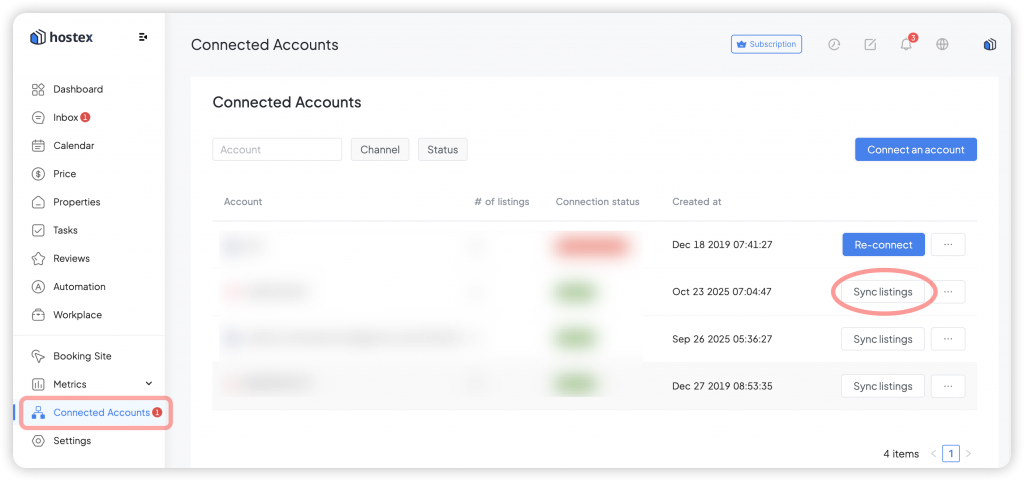
Hostex will automatically pull the latest property details, calendar availability, and pricing from the platform.
 English
  Chinese