HostGPT: The AI Messaging Assistant Built for Vacation Rental Hosts
HostGPT is Hostex’s specialized AI communication partner.
Powered by advanced AI technology, HostGPT understands guest intent like a real human assistant. Unlike generic bots, HostGPT is “Context-Aware”—meaning it understands your property details, calendar status, and guest history to provide human-like, accurate responses 24/7.
Core Features of HostGPT
1. Context-Aware Automated Replies
Before responding, HostGPT performs multi-dimensional data analysis to ensure replies are relevant and accurate — never generic or careless. It primarily references:
- Property details: Automatically reads your listing descriptions, amenities across connected channels, and check-in instructions configured in Hostex.
- Custom knowledge base: You can teach HostGPT anything using natural language. It will remember and apply this knowledge in future replies.
- Conversation history: Learns from past conversations and adapts responses to your operating habits and preferences.
2. Intelligent Escalation Mechanism
- Emotion detection: HostGPT can detect negative guest sentiment. If a guest shows signs of anger or is likely to complain, the AI will automatically pause responses and notify the host to step in, preventing escalation.
- Human handoff: When a message clearly indicates the need for human involvement, or when the request must be handled manually, HostGPT will proactively alert you.
- Hallucination prevention: If a question is not covered in the knowledge base, HostGPT will not guess. Instead, it will politely inform the guest that manual confirmation is required, and Hostex will notify you immediately.
3. Seamless Multilingual Support
HostGPT automatically detects the guest’s language (e.g., English, Japanese, French) and replies in that language.
No external translation tools are required; you can easily host guests from around the world.
How to Enable HostGPT
1. Log in to the Hostex web dashboard
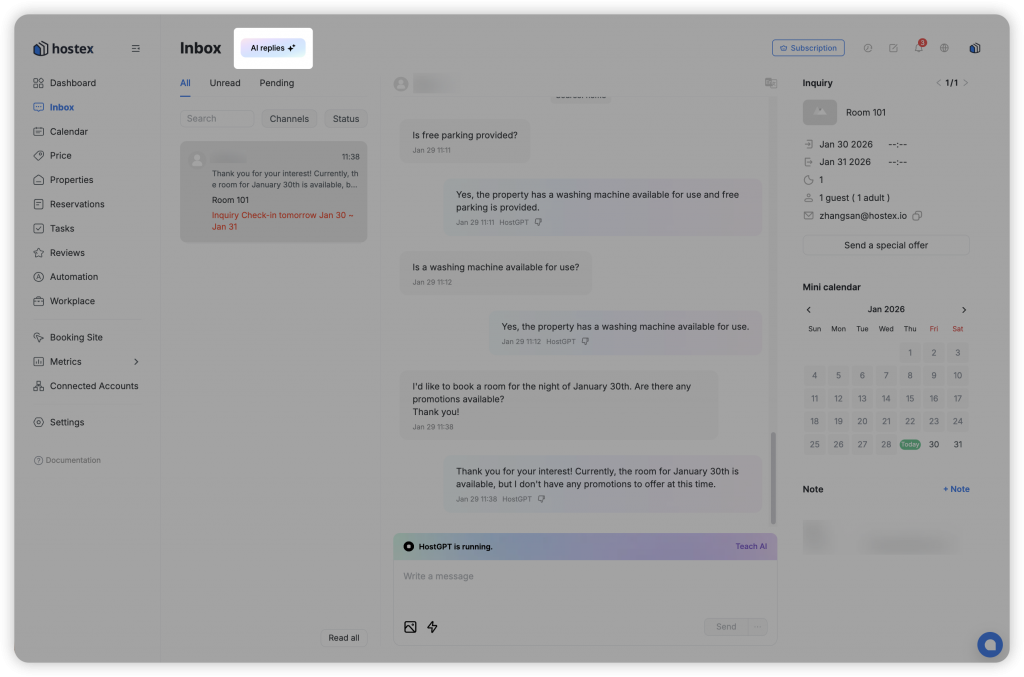
2. Go to the Inbox page and click the HostGPT button at the top
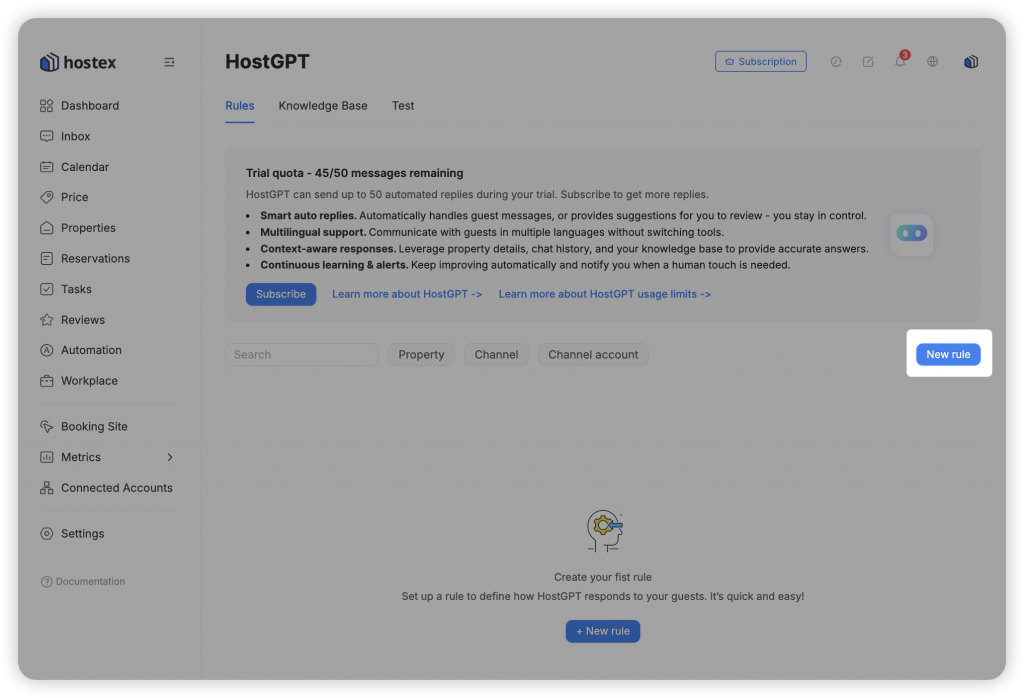
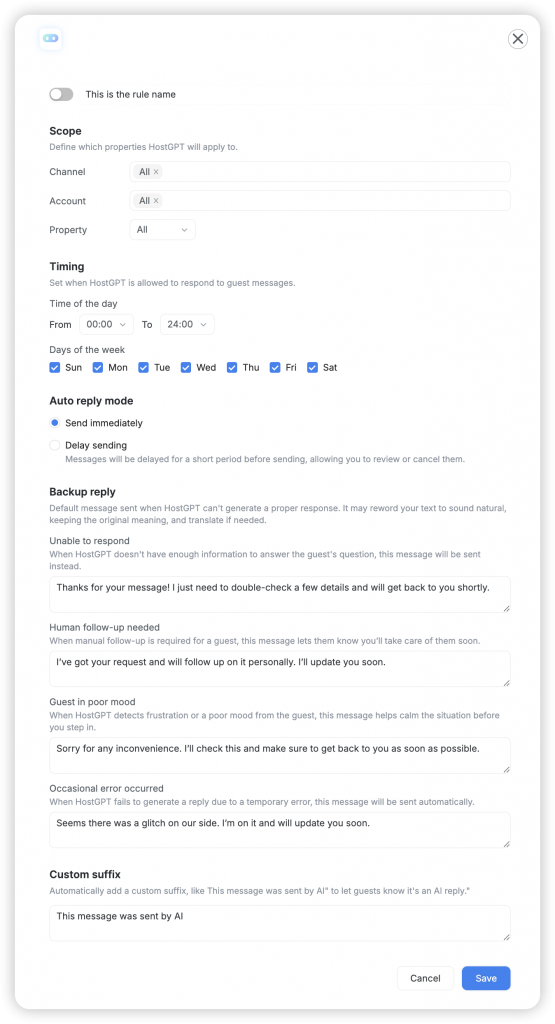
3. Click Add Rule and configure the scope and reply mode
4. Save the rule and enable HostGPT
How to Test HostGPT
Before officially enabling automation, we recommend testing HostGPT to evaluate whether it meets your operational needs.
- Enter the Test page
- Use system-provided sample questions or input your own simulated guest questions
- Switch between different rooms to test HostGPT’s performance across listings
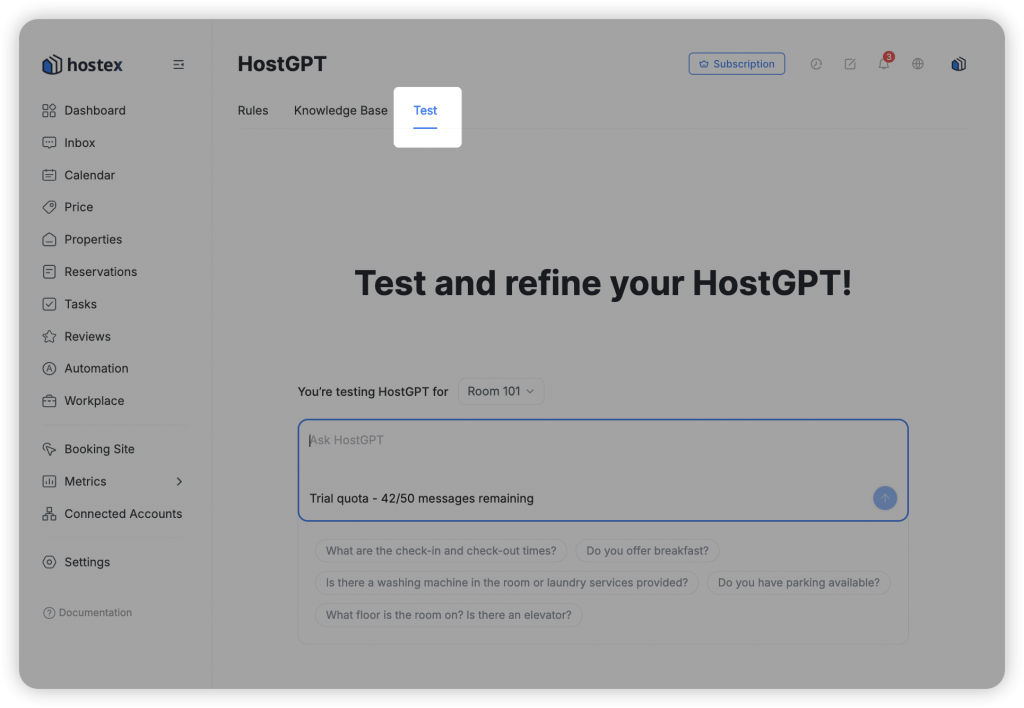
⚠️ Note: Testing consumes your monthly quota.
How to Train and Fine-Tune HostGPT for Better Accuracy
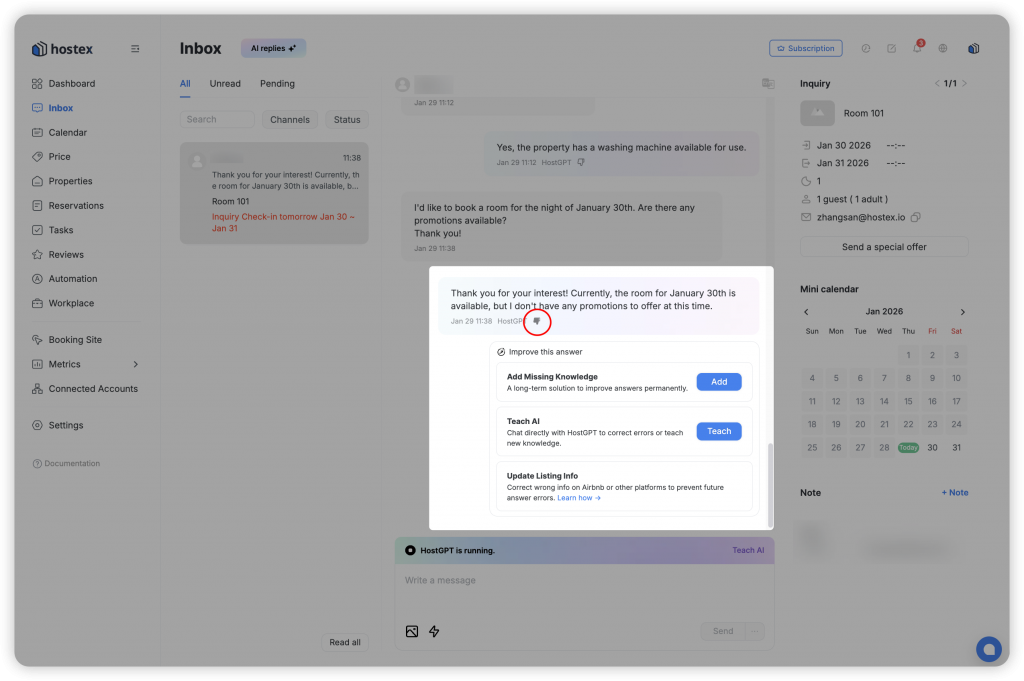
If HostGPT’s replies are incomplete, inaccurate, or not aligned with your real-world situation, you can train and adjust it in multiple ways. HostGPT will automatically apply the latest knowledge in future responses.
- Enhance the knowledge base: Add any relevant information and apply it to selected rooms
- Teach AI: Use natural language at any time to add information that applies only to the room associated with the current conversation
- Update OTA listings: Update property descriptions, amenities, or rules on platforms such as Airbnb
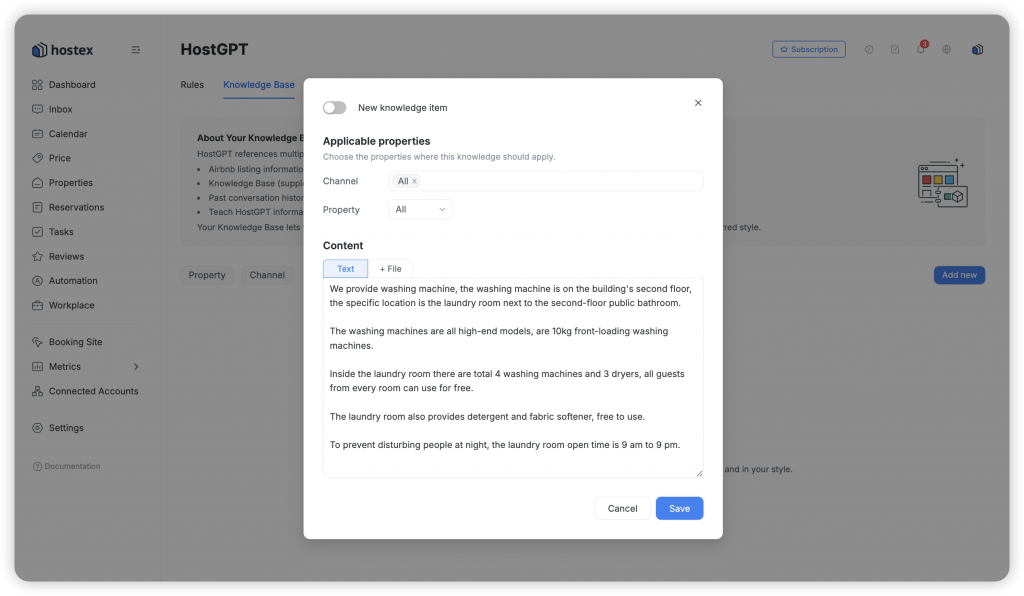
How the HostGPT Knowledge Base Works
Traditional large language models pull generic information from the internet, making it difficult for them to fully understand your business or serve you precisely.
HostGPT is different. You can store any property-specific details (such as Wi-Fi passwords, appliance instructions, or your personal local recommendations) directly in the knowledge base. This allows the AI to deeply understand your operation and apply that knowledge in future conversations — behaving like a seasoned local host with years of experience.
You don’t need complex prompts or technical commands — simply communicate with the AI using natural, everyday language.
Examples:
- “My apartment has two doors. The apartment door uses a smart lock with a dynamic code. The building entrance code is fixed: 1234.”
- “From the community entrance, turn right, walk into the alley, and you’ll find a hidden gem Northeast Chinese restaurant that most people don’t know about.”
- “The air-conditioner remote is in the top drawer of the bedside table. Extra batteries are also in the same drawer.”
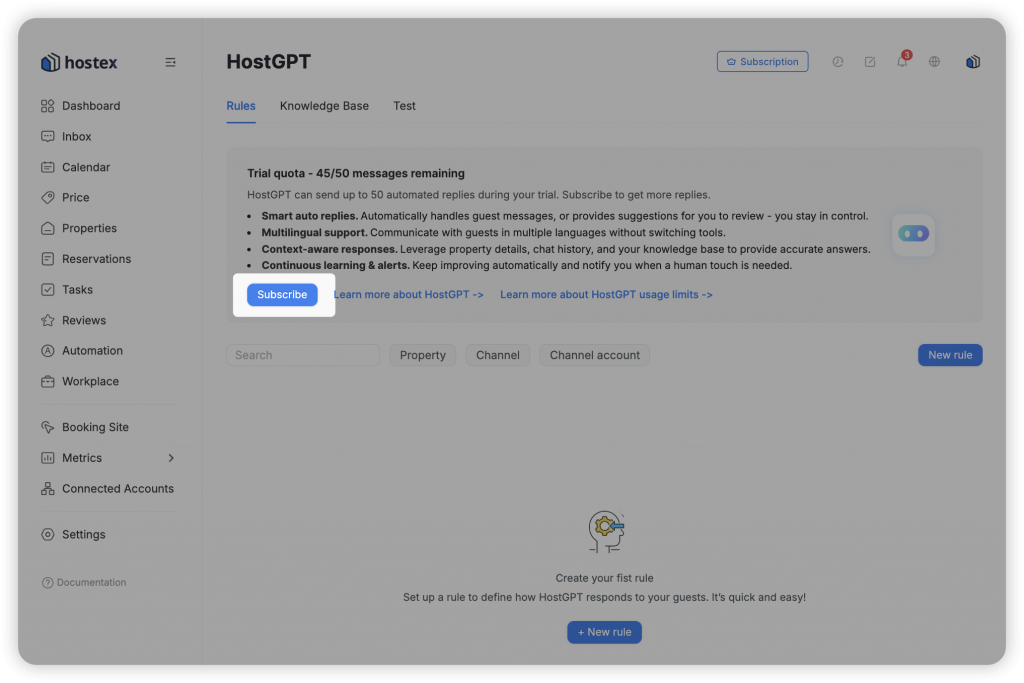
HostGPT Usage Quotas
Since HostGPT utilizes advanced external Large Language Models (LLMs), usage is managed via quotas:
| Account Type | Monthly Quota | Notes |
| Trial User | 50 replies total | Includes test messages. |
| Hostex Subscriber | 10 replies per property | Minimum of 50 replies per user. |
| HostGPT Add-on | 100 replies per property | Best for high-volume hosts. |
💡 Scenario: You manage 3 properties on Hostex.
- If you are on a Hostex Trial: You receive a fixed quota for your entire trial period. In this case, you can use HostGPT for 50 automated replies in total.
- If you are a subscribed Hostex user (without the add-on): You receive 10 free replies per property each month, with a minimum guarantee. For your 3 properties, this means you get 50 replies per month (the minimum threshold applies).
- If you purchase the HostGPT Add-on service: each of your 3 properties receives 100 replies per month, giving you a total of 300 automated replies every month.
Note: Once a quota is reached, HostGPT will pause automatically until the next billing cycle or until you upgrade.
Important Notes
1. Testing also consumes quota
2. Add-on pricing is prorated based on the remaining duration of your Hostex contract
3. Add-on quotas are issued by calendar month (Example: If you purchase the add-on on April 15 and your subscription ends on May 10, you will receive 100 replies per property in April and 100 replies in May)
4. Quotas do not roll over: Trial quotas do not roll over into paid quotas; Unused monthly quotas do not carry forward
How to View HostGPT Information Sources
For transparency and traceability, each HostGPT reply displays reference markers (such as ①, ②) whenever possible. Clicking these markers allows you to see which information sources were used to generate the response.
Currently supported reference types include:
- Knowledge Base
- Check-in Guide
- Historical Chat Records
- Selected Automation Rules
- Teach AI Entries
⚠️ Important Notes
- Final responsibility: HostGPT uses large language model (LLM) technology to generate replies. While highly effective, it may not always be 100% accurate. Hostex is not liable for losses resulting from AI-generated responses.
- Emergency situations: For legal matters, claims, or serious property damage, hosts are strongly advised to handle communication personally.
- Continuous training: The more detailed your knowledge base, the more HostGPT will behave like you.
Related Question:
 English
  Chinese