
Your Airbnb listing may have great photos, thoughtful amenities, and a competitive price. But there’s one detail you might be overlooking: your host profile.
What do guests see when they click on your name? And could a few small changes make your profile more appealing to potential guests? Here’s how to get your Airbnb host profile right
What Is an Airbnb Host Profile?
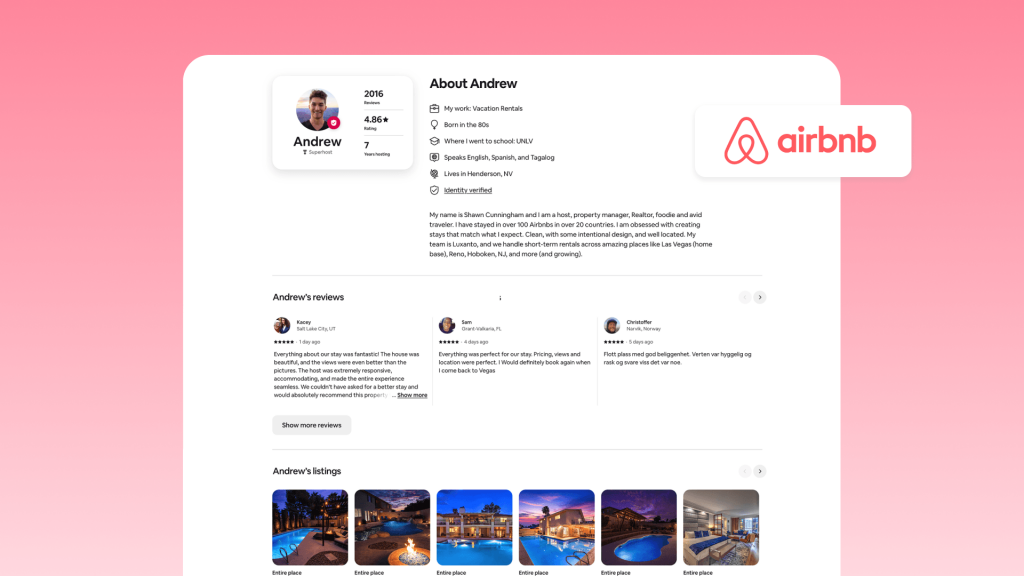
Your Airbnb host profile introduces you to potential guests. Depending on where they view it, they may see:
- Basic information: Your name and how long you’ve been hosting on Airbnb.
- Hosting track record: Your star rating and the number of reviews you’ve received.
- Personal details: Information you’ve added about your work, hobbies, languages, and interests.
- Your listings: Other properties you host on Airbnb, giving guests a broader view of your accommodations.
- Guidebooks: Local recommendations you’ve compiled to help guests discover places to visit, eat, and explore.
Guests can encounter your profile while browsing listings or open it from your listing page. The information displayed can vary by context, so the listing page and the full profile won’t necessarily show the same details.
Why Your Airbnb Profile Affects Bookings
The profile and the listing do different jobs. Your listing describes the property. Your profile describes the person behind it. Most guests read both, and a weak profile quietly undermines an otherwise strong listing.
Booking a stranger’s home requires trust. Before making a reservation, guests may want to know who they’re dealing with and what kind of hosting experience to expect. A thoughtful profile helps answer these questions.
Your profile can also help set expectations. For example, mentioning the languages you speak or whether you live nearby gives guests useful context before they book.
How to Create an Effective Airbnb Host Profile
1. Choose a Clear Profile Photo
A recognizable photo helps guests put a face to the name. Airbnb provides photo-upload guidance to help users choose an appropriate image, but your photo should also comply with the platform’s content policies.
Here are a few practical tips:
- Use natural light. Take the photo near a window or outdoors in soft daylight.
- Choose a simple background. A plain wall or an uncluttered setting keeps the focus on your face.
- Frame yourself clearly. Ask someone to take the photo from a comfortable distance, leaving some space around your head and shoulders.
- Keep editing minimal. Avoid heavy filters or retouching that makes the photo look unlike you.
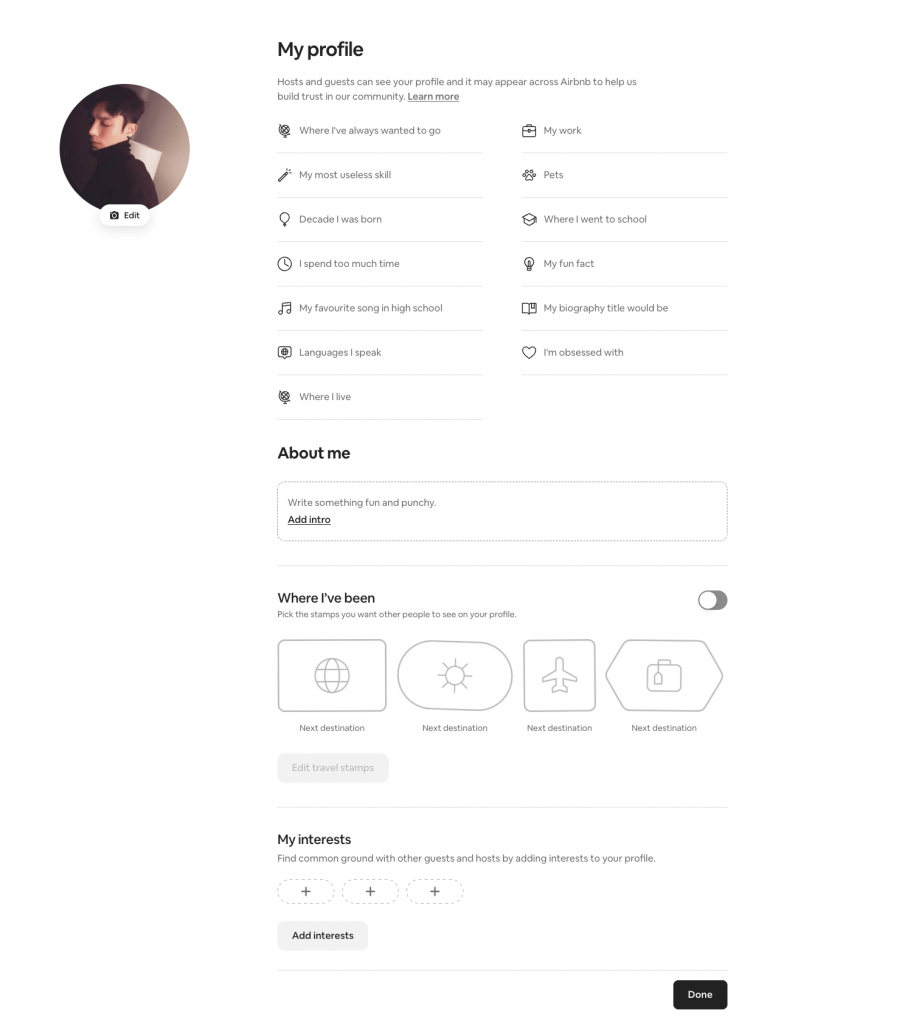
A update your photo, open your profile settings and look for the profile-editing options. The exact steps may vary with Airbnb’s interface.
2. Write a Bio That Sounds Like You
Airbnb encourages hosts to share details such as their work, hobbies, languages, and what makes their hosting experience distinctive.
Write your bio as a personal introduction rather than a sales pitch. Explain what you do, why you started hosting, or what you enjoy about your local area. One or two specific details are usually more memorable than a long list of generic adjectives.
As a practical guideline, aim for roughly 100 to 200 words. This is a writing recommendation, not an official Airbnb word-count requirement.
Avoid copying your listing description or filling the bio with amenities. Guests can find those details on the listing page. Use this space to tell them something they wouldn’t learn from the property description alone.
Por ejemplo:
Hi, I’m Dana. I’ve worked as a nurse in Denver for twelve years and started hosting our guest house after my kids moved out. I speak English and passable French. On weekends, I’m usually on a trail with Maple, our golden retriever. Ask me about the breakfast spots on South Broadway. I live ten minutes away if anything comes up during your stay.
3. Complete Identity Verification
Airbnb requires hosts and other covered users to complete identity verification under its applicable policies.
To complete verification:
- Open your Airbnb account settings and find the personal information or identity verification section.
- Follow the on-screen instructions to provide the requested information.
- If prompted, photograph your government-issued ID and submit a matching selfie or other requested material.
- Wait for Airbnb to confirm the result.
Airbnb says verification typically takes less than an hour, although the time can vary depending on your location and the information you submit. Not everyone will be asked to provide the same documents.
4. Build a Helpful Review History
Guest reviews give prospective guests a record of previous stays and can help them understand what to expect from you as a host.
You can’t write your own guest feedback, but you can maintain a consistent hosting routine. After checkout, review the guest when appropriate and invite feedback through a professional, considerate hosting experience.
For more guidance, see our articles on Tips to get more good reviews y Plantillas de reseñas de anfitriones de Airbnb.
5. Keep Your Profile Accurate and Up to Date
Review your profile every few months and update details that have changed. Check that your photo still looks like you, your bio reflects your current circumstances, and the languages and interests you’ve listed are still accurate.
Update it sooner if you change careers, relocate, or make a significant change to how you host. Accurate information helps guests form realistic expectations before they arrive.
FAQ about Airbnb Host Profiles
Are Airbnb host profiles public?
Guests can access host profile information through Airbnb, including from listing pages. The information shown can vary depending on where the profile appears and the details available on the account.
Can I have two Airbnb accounts?
Airbnb generally restricts individuals from maintaining multiple accounts, although exceptions may apply to certain professional hosting arrangements. Check Airbnb’s current account policies before creating another account.
Does my profile photo have to show my face?
Airbnb provides guidance for choosing a recognizable profile photo. Additional requirements may apply if you participate in the Co-Host Network, so check the rules relevant to your account and location.
How long does identity verification take?
Airbnb says the process typically takes less than an hour, but the actual time depends on your location and the information requested. Some cases may take longer.
What is the fastest way to improve a weak profile?
Start with the essentials: use a clear photo, write a personal and accurate bio, and complete any required identity verification. Then review your existing information and correct anything outdated.
What are the most common Airbnb host profile mistakes to avoid?
- Ignoring outdated information. Review your profile periodically and correct details that no longer reflect your circumstances.
- Leaving the bio blank. Without a personal introduction, guests have less information about the person hosting them.
- Using an unclear or outdated photo. Choose an image that guests can readily recognize as you.
- Making unsupported claims. Only include details about your background, availability, and hosting arrangements that you can stand behind.
- Copying the listing description. Use your bio to introduce yourself instead of repeating property features.
Pensamiento final
A well-written profile starts the conversation. Consistent hosting is what makes guests remember you.
Your host profile sets expectations before a guest arrives. The real test is whether the experience lives up to them. If your bio promises local expertise, offer recommendations worth saving. If you describe yourself as responsive, make sure guests know how to reach you and receive timely replies.
Keeping that promise becomes harder as your bookings grow. Tools like Hostex can help automate routine guest messages and keep communication organized, giving you more time to focus on the personal touches that make a stay memorable.

 Spanish
 English
 Japanese
 Arabic
 French
 Russian
 German
 Portuguese
 Korean
 Italian
 Thai