
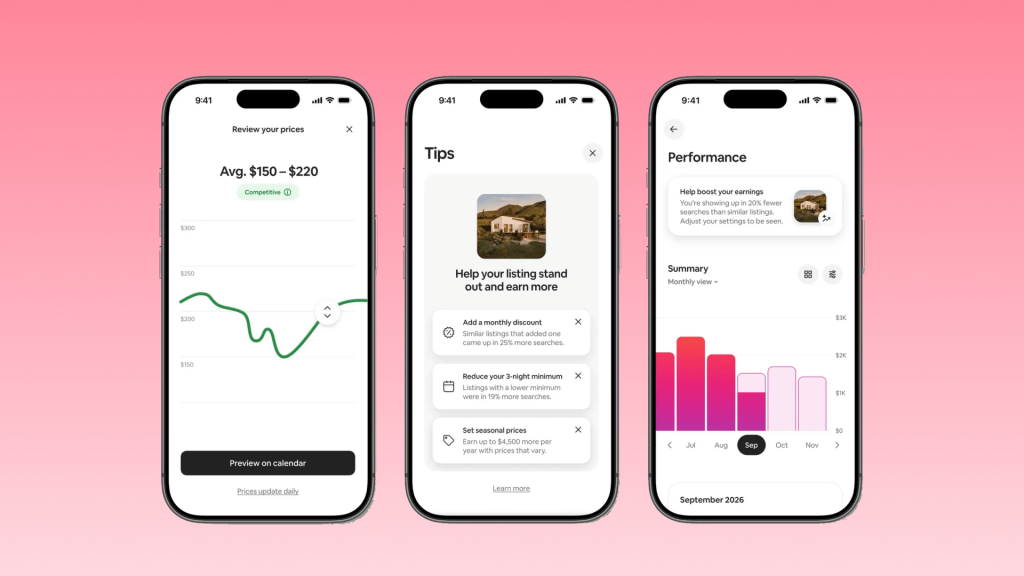
Airbnb has spent its life as a marketplace. You list a home, guests book it, and Airbnb takes a cut. The 2026 Fall Update points to a broader role for the platform. Alongside improvements to listing creation, Airbnb is introducing tools that influence how hosts price their properties, attract guests, and manage their portfolios.
That shift brings real benefits, but also raises an important question: how much control should you hand over to the platform?
The answer depends on the tool. Some features can improve efficiency with relatively little downside. Others deserve a closer look before you enable them. Understanding the difference will help you take advantage of the update without giving up more control than you intend to.
What’s New in the Airbnb 2026 Fall Update?
1. Top-Rated Guest Discount: Lower Your Price for Best Guests
Airbnb is rolling out a special discount for top-rated guests, giving hosts a way to attract experienced, well-reviewed travelers without lowering prices for everyone.
كيف يعمل؟
- Eligible guests: Rated above 4.8 stars, with at least 3 reviews.
- Discount: 15% off the regular rate.
- Extra visibility: Eligible guests may see your listing ranked higher in search results, with a discount badge and the original price displayed alongside the reduced rate.
Early results look promising. According to Airbnb, hosts who offered similar discounts during a pilot from June 17 to July 7, 2026, earned 11% more and booked 14% more nights on average. These are modeled results based on observed performance, so actual outcomes will vary by listing and market.
The idea makes sense: guests with strong review histories may be a better bet, and targeted discounts can help attract them. However, a high rating does not guarantee a problem-free stay, and a 15% discount can eat into your margins.
The key question is whether the discount brings you bookings you would otherwise miss. If those guests would have booked at your regular rate anyway, you may simply be giving up revenue.
If you manage your Airbnb listings through هوستكس, you can enable this discount directly in Hostex alongside your other promotions.
2. Multi-Listing Calendar: Edit Many Listings at Once
Airbnb’s redesigned calendar makes it easier to manage multiple properties without editing each listing individually.
What’s new:
- Bulk editing: Update prices, availability, cancellation policies, and discounts across multiple listings.
- Property grouping: Organize listings by location or property type.
- Availability management: View open nights and reservations at a glance, with automatic minimum-stay adjustments to help fill gaps between bookings.
For example, you can raise rates across all your beach properties for a holiday weekend in one move.
The redesigned desktop calendar will become the default for hosts with six or more listings as the feature rolls out over the coming months.
How does it compare with a PMS?
Airbnb’s calendar simplifies management within its own platform. Hostex’s Multi-Calendar, by contrast, lets hosts manage pricing and availability across connected booking channels.
If you also list properties on Vrbo, Booking.com, or your own direct booking website, cross-channel coordination remains essential. Bulk editing saves time, but you still need to keep availability consistent across platforms to avoid double bookings.
3. Dynamic Pricing: One Tap Hands the Rate to Airbnb
Airbnb is introducing dynamic pricing that automatically adjusts nightly rates based on daily supply and demand. Hosts can set a recommended price range, change it at any time, or edit prices directly in the calendar. The feature begins rolling out in October.
The main benefit is convenience. Hosts who currently adjust rates manually can spend less time monitoring demand and updating calendars.
The trade-off is control. Once enabled, Airbnb can adjust your nightly prices within the range you set. That may help fill vacant nights, but more bookings do not necessarily mean higher profits.
For example, a host facing strong demand during a local event may prefer to maintain higher rates rather than prioritize occupancy.
Before enabling the feature, consider two things:
- Your pricing limits: Set a minimum rate that covers your costs and fits your revenue goals.
- Your existing tools: If a pricing tool or PMS already adjusts rates automatically, decide which system will control pricing to avoid conflicting updates.
Airbnb’s tool may suit hosts who want a simpler pricing process. Those managing properties across multiple channels may prefer to keep pricing centralized in their existing system.
4. AI Earnings and Pricing Insights: See Why Revenue Moved
Airbnb is adding AI-generated performance summaries to its earnings dashboard. The feature compares expected earnings with similar nearby listings, highlights factors affecting performance, and suggests actions hosts can take directly from the dashboard.
For example, it may recommend enabling Instant Book or adding missing amenities. Hosts with five or fewer listings will receive access first.
A related set of pricing and availability insights analyzes what guests in the area search for and suggests calendar adjustments, including last-minute settings to help fill unbooked nights. These insights also begin rolling out in October.
The two tools answer different questions:
- Earnings insights: How is your listing performing compared with similar properties?
- Pricing and availability insights: What changes might help attract more bookings?
These features can make Airbnb’s data easier to interpret, particularly for hosts who do not regularly analyze performance metrics. However, comparisons with nearby listings may not account for differences in property quality, amenities, operating costs, or target guests.
Treat AI recommendations as a starting point, not instructions to follow automatically. A suggestion to lower prices, for instance, may not make sense if your property already attracts strong demand.
Airbnb’s dashboard also focuses on performance within its own platform. If you accept bookings through multiple channels, Hostex’s reporting can help you track revenue and expenses across connected platforms in one place.
5. 3D Floor Plans and Smart Setup: Raise the Listing Bar
Two additional tools aim to make listing creation easier and help guests better understand a property.
3D Floor Plans
- Scan your property using an iPhone 12 Pro or later, or an iPad equipped with a LiDAR camera.
- Create an interactive floor plan that guests can explore before booking.
- Automatically detect basic amenities during the process.
The feature is rolling out now.
Smart Setup
Enter a property address to generate a listing using available property details. You can review and edit the information before publishing.
Smart Setup is currently available for eligible homes in the US, with a broader rollout planned for early next year.
Both tools reduce the work involved in preparing a listing. However, hosts should still verify automatically generated details and ensure the listing accurately represents the property. A floor plan can clarify the layout, but it cannot replace good photos and a clear description.
What Hosts Should Do Before Turning Anything On
Airbnb’s new tools can save time, but not every feature will suit every hosting business. Before enabling them, consider the following.
1. Set Your Price Floor Before Using Dynamic Pricing
Calculate the lowest nightly rate you can accept after accounting for cleaning costs, platform fees, and other expenses. Then check whether Airbnb’s recommended price range fits your limits.
If you already use an automated pricing tool, decide which system will control rates before enabling another one.
2. Evaluate the Guest Discount Against Your Profit Margins
A 15% discount may attract additional bookings, but it also reduces revenue per reservation.
Consider whether the discount is likely to bring in guests who would otherwise book elsewhere. If demand is already strong, offering a lower rate may not generate enough additional bookings to justify the reduction.
3. Keep Your Calendars in Sync Across Channels
Airbnb’s multi-listing calendar only manages Airbnb listings. If you also accept reservations through other OTAs or your own website, make sure bulk changes remain consistent across platforms.
A centralized channel management system can help coordinate availability and reduce the risk of double bookings.
4. Check AI Recommendations Against Your Own Data
Before acting on an AI suggestion, review your booking pace, occupancy, average nightly rate, and listing details.
For example, if earnings are lower than expected, the cause may be weak demand, limited visibility, or pricing that does not match the market. A single recommendation may not address the underlying issue.
Use Airbnb’s insights to identify areas worth investigating, then make decisions based on your actual performance.
5. Get the Listing Basics Right Before Adding More Features
3D floor plans and Smart Setup can improve the listing experience, but they work best when the fundamentals are already in place.
Make sure your photos are clear, your description is accurate, and your amenities and house rules are complete. Review any automatically generated information before publishing it.
FAQ about the Airbnb 2026 Fall Update
Is the top-rated guest discount the same as a regular price cut?
No. The 15% discount applies only to guests rated 4.8 stars or higher who have at least three reviews. Other guests continue to see your regular rate.
Should I turn on dynamic pricing if I already use a pricing tool?
Check whether both systems can automatically adjust the same rates. If they can, choose one as your primary pricing system and configure the other to avoid conflicting updates.
When will the Airbnb 2026 Fall Update features roll out?
According to the announced rollout plans:
- 3D Floor Plans: Rolling out now.
- Smart Setup: Available for eligible US homes, with expansion planned for early next year.
- Dynamic Pricing and pricing insights: Starting in October.
- Multi-Listing Calendar: Rolling out as the default desktop calendar for hosts with six or more listings over the coming months.
Availability may vary by host and market.
Does the multi-listing calendar replace a channel manager?
No. Airbnb’s calendar manages multiple listings within Airbnb. A channel manager or PMS helps coordinate reservations and availability across connected booking platforms.
Can the top-rated guest discount be combined with other Airbnb discounts?
Yes. Airbnb places the top-rated guest discount in a separate discount tier, allowing it to combine with promotions such as early-bird and last-minute discounts. Check the combined discount before enabling multiple offers to ensure the final rate still works for your business.

 Arabic
  English
  Japanese
  Spanish
  French
  Russian
  German
  Portuguese
  Korean
  Italian
  Thai
Thai