
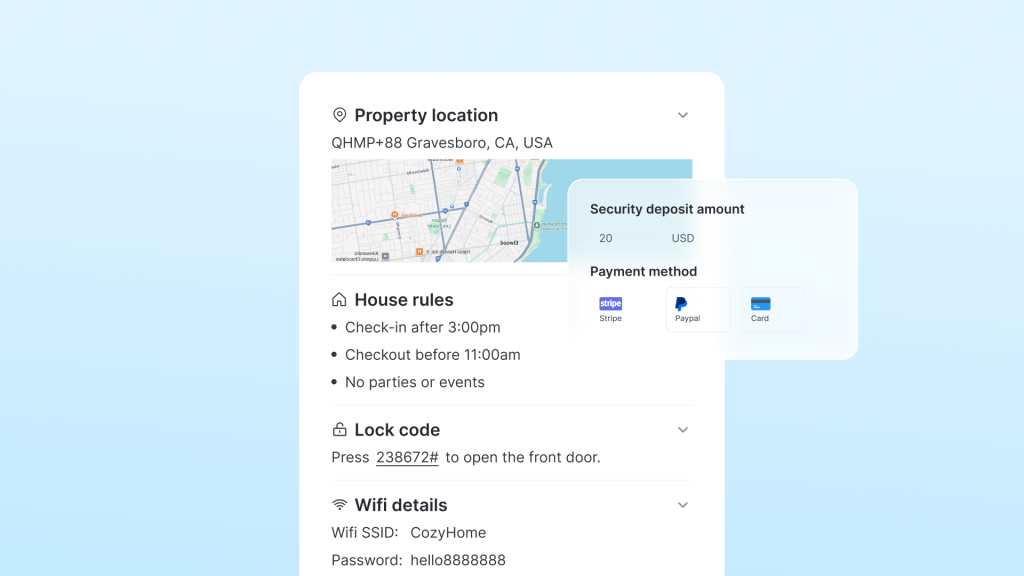
A guest should not have to search a long message thread to find the Wi-Fi details or work out which entrance to use. A vacation rental welcome guide gives those practical answers a clear home, while keeping the right support available when instructions are not enough.
This guide explains what to include, how to organize it for a phone, and how to share the appropriate information before and during a stay. It complements the wider guest communication process.
Welcome Guide, Welcome Book, or House Manual?
Hosts use these names in overlapping ways. Choose a useful structure rather than creating separate documents solely because the labels differ.
A practical welcome guide can bring together arrival information, instructions for living in the home, local recommendations, and departure details. However, a publicly shareable recommendations page and reservation-specific access instructions need different handling. A door code should not become part of a public template or an unrestricted link intended for general travel tips.
Keep the first arrival message concise and link to the relevant detail. The check-in instruction templates focus on that message; the maintained guide supports the rest of the stay.
What to Include in Your Vacation Rental Welcome Guide
1. Arrival and Access
Explain the correct entrance, parking location, arrival timing, and the steps needed to get inside. Add a current photograph where a building has several similar doors or a lock is unfamiliar.
Tell guests when and where they will receive any reservation-specific code, plus what to do if it fails. Keep sensitive access details in the appropriate guest-only route and check the access schedule against the actual reservation.
2. Wi-Fi and Everyday Devices
Show the guest network name and password clearly. Give only the instructions needed for the actual equipment, such as which remote controls the television or how to select its input. Do not include the router’s administrator credentials.
Use the guest’s task as the label: “Connect to Wi-Fi” is easier to recognize than a general heading such as “Connectivity.” Keep troubleshooting beside the relevant device and provide a support contact if the first steps do not work.
3. Appliances and Comfort
Cover the non-obvious steps for the thermostat, cooker, coffee maker, laundry equipment, and any other important amenity. Use the actual model in the property rather than generic instructions copied from another home.
For example: “Coffee filters are in the drawer below the machine. Use the marked water level for the number of cups, then press Start.” Replace that example with verified instructions for your equipment and add a photo where a control is difficult to identify.
4. House Rules and Practical Expectations
Restate the relevant, already disclosed rules in plain language, with specific locations and times where needed. Use the house rules guide for examples, but preserve the meaning of your actual policy; making a rule sound friendlier should not accidentally permit an activity you prohibit.
The guide should not introduce new conditions after booking. Airbnb’s updated house rules policy, applying to reservations booked on or after November 20, 2026, requires disclosure in the designated listing section and limits unreasonable demands. Check the policy applicable to the reservation.
5. Help and Emergency Information
Make the host or support contact easy to find, with a backup route if the main contact cannot respond. Distinguish ordinary help from an emergency: guests facing immediate danger should follow the property’s emergency information and contact the appropriate local emergency service.
Verify the property address, emergency contact details, and any location-specific evacuation information before sharing them. Do not ask guests to diagnose hazardous electrical, gas, or equipment faults themselves.
6. Local Recommendations
Offer a short, selective list with a reason for each recommendation: nearby groceries, a suitable meal after a late arrival, or an activity relevant to the guest’s trip. Include practical details that you have checked, rather than a long directory.
Keep opening hours and availability under review. A personal suggestion is useful when it helps someone choose; it should not imply a guarantee about a business you do not control.
7. Departure Information
State checkout time, the key or lock procedure, and any reasonable departure instructions that apply to the booking. Use the checkout instruction guide for the departure message.
Keep the team’s turnover work separate. A guide is not a place to add undisclosed chores or transfer a professional cleaning checklist to the guest.

Make the Guide Easy to Use
Put the information guests need immediately near the front, and make support easy to reach throughout. Use clear section names, short action-led instructions, and photographs that show the exact object or location involved.
Let detail follow the quick answer rather than enforcing a one-line limit. An unusual access arrangement may need more explanation; removing a necessary step for brevity can make the instruction less useful.
Test the guide on a phone as someone unfamiliar with the home. Ask a co-host to find the entrance, Wi-Fi details, and support route using only the guide. Note where they hesitate, then fix those points instead of adding more general advice.
If providing translations, verify important directions and equipment labels. A translated instruction must still match the signs and controls the guest will see.
Share the Right Information at the Right Time
| เวที | Useful information | Delivery check |
|---|---|---|
| After confirmation | Planning information, general guide location, and contact route | Correct property and guest, with no unintended release of access details |
| Before arrival | Current directions and the applicable entry instructions | Reservation timing, code validity where relevant, and working guest access |
| During the stay | House instructions, local suggestions, and support | Information remains reachable without searching an old thread |
| Before departure | A concise checkout reminder | Correct departure date and instructions consistent with the booking |
These stages describe information needs, not a required number of automated messages. Account for changed or canceled reservations, and answer an immediate question directly when that is more helpful than sending the whole guide again.
โฮสเท็กซ์ guest guidebook can display arrival details, Wi-Fi information, and house rules through a mobile-friendly link. The link can be included in automated messages. Verify the guest view and the timing configured for your property before relying on the workflow.
Keep document collection and deposits separate from ordinary instructions. A software feature does not establish permission to require an ID upload, payment, or extra account for every channel booking. Follow the relevant platform’s rules; Airbnb’s personal-data and access requirements policy explains its restrictions and exceptions.
Provide an appropriate fallback for poor connectivity or a failed link, such as essential offline instructions and a reachable contact. A printed quick reference can support a digital guide; update both when information changes.
Keep One Maintained Source of Property Facts
Assign someone to update the guide when equipment, passwords, access arrangements, or services change. Check the listing, message templates, printed copy, and guide for conflicting information. The automated messaging guide covers delivery workflows.
Review repeated guest questions and feedback from cleaners or co-hosts. A guide can reduce avoidable confusion, but it cannot guarantee a particular review score or compensate for an unresolved property problem.
คำถามที่พบบ่อย
Do I need separate welcome guides and welcome books?
Usually there is no need to duplicate the same instructions under both names. Separate content when its purpose or access requirements differ, such as public local tips and private entry details.
Should I send everything as soon as a booking is confirmed?
No. Share useful planning information early, then provide sensitive or reservation-specific instructions through the appropriate route and timing. Confirm how the booking channel delivers its own arrival information.
Should guests need the guide to contact me?
No. Keep a usable contact route in the booking conversation and essential instructions so a failed link does not become a barrier to getting help.
ความคิดสุดท้าย
Decide who can edit the guide when a supplier or team member manages it for you. Keep control of the original files and sharing settings, and arrange a handover when responsibilities change. Otherwise, the person who notices an urgent correction may have no way to update the instructions guests are using.


 Thai
 English
 Japanese
 Spanish
 Arabic
 French
 Russian
 German
 Portuguese
 Korean
 Italian