
TL;DR: A vacation rental security deposit provides immediate financial protection against damages and serves as a powerful tool to screen for high-quality guests.
Policies vary significantly across major OTA platforms:
- Airbnb: Standard hosts are prohibited from collecting off-platform deposits. Only hosts using a connected PMS are permitted.
- Booking.com: Hosts are fully responsible for their own deposit management and must arrange collection independently.
- Vrbo: Vrbo typically requires in-platform deposits; Integrated property managers (IPM) may use their own payment gateways.
By staying compliant with these platform rules, you can use PMS (like Hostex) to automate the collection, refund, and deduction of deposits safely and efficiently.
When setting your deposit amount, you should perform a balanced analysis based on your property’s Replacement Value, Rate Proportionality, and specific Risk Weighting factors.
As a professional vacation rental management software, Hostex helps you automate up to 70% of your cross-platform management tasks. Beyond channel management, it also supports seamless security deposit collection. You can access these powerful tools and more starting at just $4.90 per month.

Renting out your property involves opening your doors to total strangers, which means property damage is a genuine risk. In fact, it remains one of the biggest challenges of running an Airbnb business. However, you can take proactive steps to mitigate these risks. For instance, purchasing proper insurance, requiring signed rental agreements, and collecting security deposits are all highly effective strategies.
This guide focuses specifically on everything you need to know about vacation rental security deposits. We will cover how to set your pricing, the best ways to collect funds, and how to handle damage claims if they occur. Our goal is to help you transition from a passive host relying on platform protection to an active manager who fully controls their own risk management.
What is a Vacation Rental Security Deposit?
A security deposit is a pre-paid sum provided by guests to cover potential costs arising from any damage caused during their stay. If the property is left in good condition and no issues are found after checkout, the deposit should be refunded to the guest in full.
The benefits of implementing a deposit system are clear and significant:
- Immediate Financial Protection: When guests damage property, stain linens, or lose keys, deducting costs from a deposit is much more efficient than filing a lengthy reimbursement claim through a booking platform.
- Screening for Quality Guests: Guests willing to pay a deposit are generally more responsible. Conversely, those planning unauthorized parties or illicit activities often avoid listings that require an upfront security deposit.
- Accountability and Care: When a guest’s funds are held by the host, they are naturally more inclined to treat the amenities with care and follow your house rules.
- Late Checkout Coverage: If a guest checks out significantly late and disrupts the cleaning schedule for the next arrival, the deposit can serve as a guarantee for late fees.
- Claims Leverage: Having the funds in hand puts you in a proactive position. Instead of waiting for a platform to review and approve your case, you maintain better control over the dispute process.
Security Deposit Policies Across Major OTA Platforms
Different distribution channels have significantly different stances on how deposits are handled. Understanding these underlying rules is the first step toward building a compliant strategy for your vacation rental.
Airbnb
Airbnb’s policy on security deposits varies greatly depending on how you manage your listings.
- Individual Hosts using the official app: Airbnb strictly prohibits these hosts from requesting deposits outside of their system. The platform primarily relies on the AirCover program, which offers up to $3 million in protection. However, this is a “reimbursement-based” system, meaning hosts must submit evidence and wait for platform approval within 14 days of checkout.
- API-connected Hosts using software like Hostex: Airbnb allows hosts who use certified software to collect deposits offline. To do this, you must clearly disclose the deposit amount and collection method in the “Offline Fees” section of your listing description. Furthermore, the collection must be processed through a regulated third-party payment system; private, unofficial transfers are strictly forbidden.
Booking.com
Booking.com places the full responsibility and authority for deposit management on the host. Generally, the platform does not intervene or provide a built-in collection tool.
As the merchant of record, you must arrange the collection of the security deposit yourself. Therefore, it is essential to clearly outline your deposit policy in the “Fine Print” or “House Rules” section of your Booking.com listing to ensure guests are informed before they book.
Vrbo
In principle, Vrbo requires all financial transactions, including rent and deposits, to be completed within its platform. The site provides a built-in “Refundable Damage Deposit” feature for this purpose.
However, there is an exception for Integrated Property Managers (IPM). Vrbo allows these professional managers to collect fees independently through their own payment gateways, such as Stripe, PayPal, or VRP.
How to Collect Vacation Rental Security Deposits?
Once you understand the platform rules, the next step is reaching out to guests to collect the funds. While manual collection is one option, using a professional tool like Hostex saves significant time and minimizes the risk of human error.
Hostex centralizes bookings from Airbnb, Booking.com, Vrbo, and Expedia. It allows you to automatically send a digital check-in guide that includes a built-in deposit payment request.
In this workflow, guests must pay the security deposit before they can access essential details like the property address or door codes.
How to Collect Security Deposits via Hostex?
Hostex integrates deeply with Stripe, utilizing a “Pre-authorization” (card hold) model. This makes the process incredibly straightforward:
1. Set Up and Automate
Connect your Stripe account to Hostex and set your desired deposit amount within the Check-in Guide settings.
Once configured, the system automatically generates a deposit request for every booking and sends it to the guest before their arrival.
2. Guest Payment
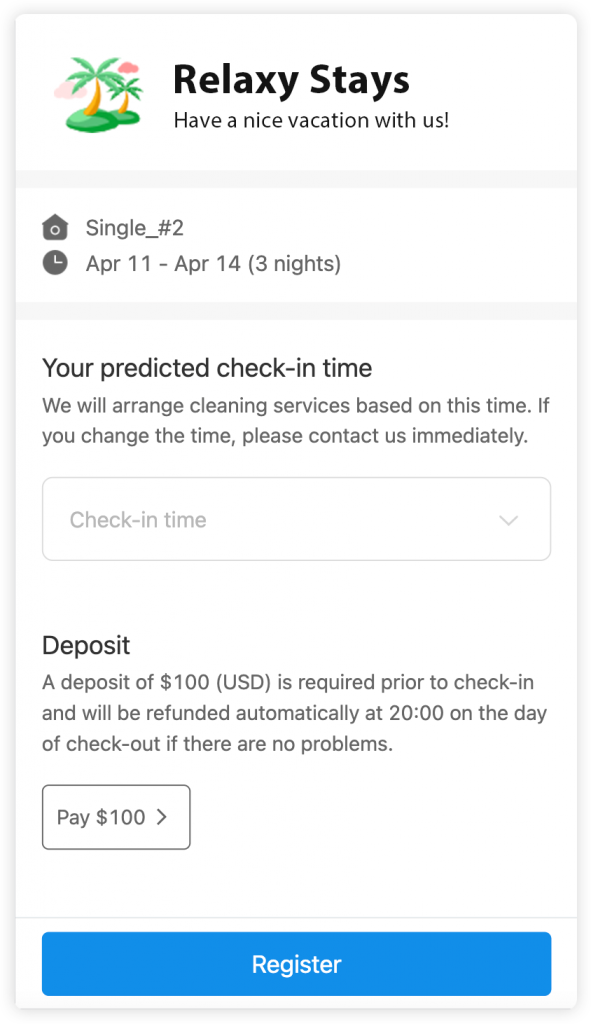
When the guest opens the check-in guide, they are prompted to provide their payment details. Access to the property address, lockbox codes, and house manuals remains locked until the security deposit is successfully processed.
Important note: Stripe charges a processing fee for every successful fund capture.
3. Refund the Security Deposit
If the stay concludes without any issues, the vacation rental security deposit will be automatically refunded to the guest at 20:00 on their checkout date.
However, if you have specific requirements, you can also access the reservation details in Hostex to manually review and process the refund.
Important note: Stripe’s hold on payment authorization is available for 7 days. Therefore, you need to capture the funds within this 7-day window. If the authorization expires before you take action, the funds are released, and the payment status will change to “Canceled.”
4. Deduct for Damages
In cases where property or item damage occurs during a guest’s stay, you have the option to manually deduct a portion or the entirety of the security deposit.
To do this, simply follow these steps:
- Check the Pending Return Deposits in the Hostex Calendar.
- Find the specific deposit you need to deduct from.
- Click on the Deduct button and specify the exact amount to be deducted.
After these steps, you can still adjust the deduction amount multiple times if necessary. Any remaining balance will then be automatically returned to the guest at 20:00 on their checkout day.
How to Set the Right Security Deposit Amount?
Setting a security deposit is not an arbitrary decision; it is a strategic balance between protecting your assets and maintaining market competitiveness. If the amount is too high, you risk losing potential bookings. Conversely, if it is too low, it may not cover your actual losses.
To find the sweet spot, consider these key factors:
- Replacement Value: Evaluate the cost of replacing fragile, high-maintenance, or expensive items in your property, such as projectors, premium rugs, or designer furniture.
- Rate Proportionality: To keep the guest’s experience balanced, we generally suggest that the deposit should not exceed 20% to 30% of the total booking value. Furthermore, if the deposit exceeds the cost of a single night’s stay, guests are statistically more likely to hesitate before booking.
- Risk Weighting: You may want to increase the amount for high-risk bookings. For example, reservations involving pets, small sanctioned gatherings, or long-term stays (over 28 days) often carry a higher potential for wear and tear.
While we cannot provide a one-size-fits-all number, you can determine the best fit based on your specific property. The table below serves as a general reference for short-term rental hosts:
| Property Type | Suggested Deposit Range (USD) | Rationale |
| Economy Studio | $100 – $200 | Covers deep cleaning fees and basic amenities. |
| Standard 2-Bedroom | $300 – $500 | Industry standard; balances risk and conversion. |
| High-end Apartment | $500 – $1,000 | Protects mid-range furniture and electronics. |
| Luxury Villa / Estate | $1,000 – $5,000 | Driven by high asset replacement value. |
Conclusion and Actionable Advice
For multi-platform hosts using Hostex to manage Airbnb, Booking.com, and Vrbo, managing security deposits should no longer be viewed as an administrative burden. Instead, it is a vital component of your brand’s competitiveness and asset protection.
To ensure your business remains secure and efficient, consider these core recommendations:
- Prioritize Compliance: Immediately review your listing descriptions on all OTAs. Ensure that your “offline deposit” policy is clearly disclosed in the appropriate fields to avoid platform penalties.
- Leverage a PMS for Collection: Major platforms generally require hosts to collect deposits through a professional Property Management System (PMS) like Hostex. Contacting guests to arrange private, off-platform payments can lead to account suspension or other risks.
- Automate the Process: Link your deposit collection directly to your Hostex check-in guides. This creates a firm “payment-for-entry” rule, ensuring you are protected before the guest arrives while eliminating the hassle of manual follow-ups.
- Use Rental Agreements: For high-value properties, we suggest requiring an additional signed electronic rental agreement. This provides extra legal standing for potential damage disputes or claims that exceed the initial deposit amount.
By implementing the right security deposit strategy, you can protect your assets while maintaining a high operational pace and a stellar reputation among your guests.


 English
  Japanese
  Spanish
  Arabic
  French
  Russian
  German
  Portuguese
  Korean
  Italian
  Thai
Thai