How to Add a Charge to a Reservation
Use a charge when you need to collect an extra amount from a guest, such as a security deposit, cleaning fee, extension fee, utility fee, or another reservation-related payment.
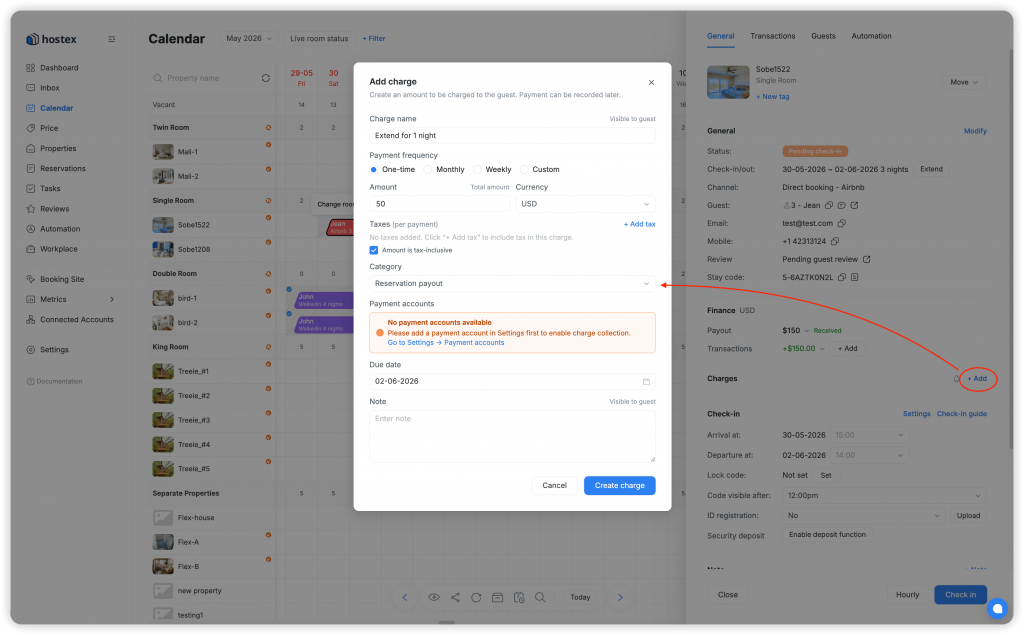
Open the Add Charge Modal
- Open the reservation detail page.
- Go to the
Chargessection. - Click
+ Chargeor+ Add. - The
Add chargemodal opens.
Fill in Charge Details
Complete the required fields:
Charge name: the name shown to you and the guest.Amount: the amount to collect.Currency: follows the reservation.Category: the income category for this charge.Payment frequency: one-time, monthly, weekly, or custom.Payment account: one or more accounts that can receive the payment.Note: optional internal or guest-facing context, depending on where it appears.
Configure Taxes
If tax applies:
- Click
+ Add tax. - Enter the tax name.
- Enter the tax percentage.
- Choose whether the amount is tax-inclusive.
If Amount is tax-inclusive is selected, the amount entered already includes tax. If not selected, tax is added on top of the charge amount.
Tax settings are remembered and can be prefilled the next time you create a charge.
Choose Payment Accounts
If only one suitable payment account exists, Hostex can select it automatically.
If multiple suitable accounts exist, Hostex defaults to the most recently created suitable account. You can change the selection before saving.
Save the Charge
- Review the charge details.
- Click
Add charge. - Hostex creates the charge and shows a confirmation message.
Charges are listed by creation time, newest first.
Charge Status
A charge or charge instance can show:
Unreceived: no payment has been received.Partial: part of the amount has been received.Received: fully paid.Excess: paid amount is greater than the charge amount.Overdue: due date has passed and the charge is not fully paid.
For recurring charges, each instance has its own due date, status, transactions, and Invoice.
Collect or Record Payment
Use Collect to send a payment link or manually record payment.
Available collection methods can include:
- Copy message.
- Send message through supported booking channels.
- Email.
- SMS.
- WhatsApp.
- Record payment.
When a guest pays online, Hostex automatically creates and links the income transaction to the charge. When you use Record payment, Hostex opens a transaction form and links the created income transaction to the charge.
 English
  Chinese